
One QR for two app stores: routing iPhone, Android, and web visitors automatically
A single device-route rule sends each scanner to the right place — and the web fallback matters more than the app links.
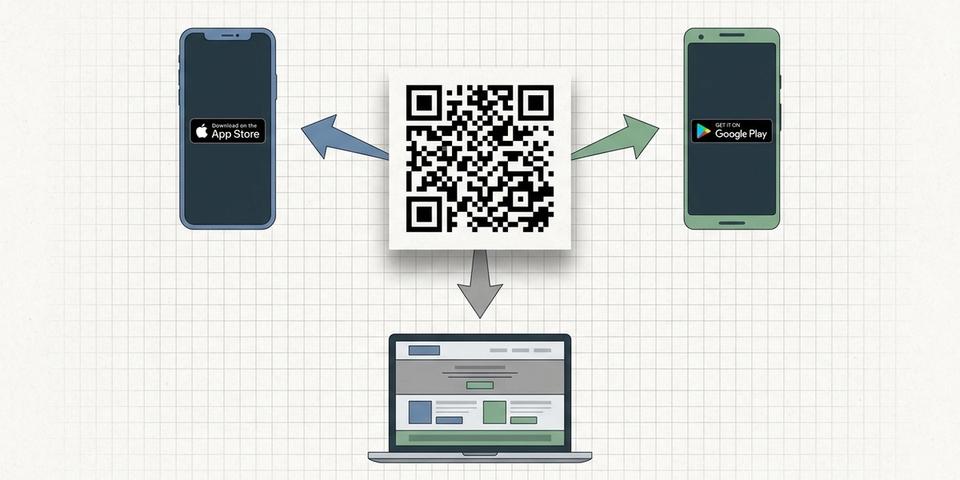
- One QR routes iPhone scans to the App Store, Android scans to Google Play, and everything else to your website
- Set up with a single device_route rule on a dynamic QR — no separate codes per platform
- The web fallback is the workhorse: it catches iPad, desktop scanners, in-app browsers, and unrecognized user agents
- It's a routing rule, not a gate — every scan completes, no one sees a block screen
The problem with one URL on a poster
You're launching an app. The launch poster says "Scan to download" — but your app lives in two stores. The App Store wants iPhones. Google Play wants Androids. And a chunk of every audience scans from somewhere else entirely: an iPad in landscape, a laptop with a webcam, an in-app browser inside Instagram or LinkedIn.
A single static URL forces a compromise. Send everyone to a landing page and you add a click between the scan and the install. Send everyone to one store and half your scanners hit a dead end. Print two QR codes side by side and most people just scan whichever one is closer.
Device routing solves this with one rule on one code. The QR stays the same. The destination changes based on who's scanning.
How device_route works
Add a device_route rule to a dynamic QR code and configure up to three destinations:
• ios — where iPhone, iPod, and iPad-in-mobile-mode visitors go • android — where Android phones and tablets go • desktop — where Windows, macOS, Linux, and Chrome OS browsers go
You also pick a fallback. The fallback is which of the three URLs to use when the user agent is missing, unrecognized, or matches a category you didn't configure. For an app-download QR the fallback is almost always desktop, which is really just "the web".
When someone scans, qrgeno reads the User-Agent header, picks the matching category, and 302s the visitor straight to the configured URL. No landing page, no extra click, no JavaScript needed. The rule never blocks — every scan completes.
Setting it up in qrgeno
Open any dynamic link QR code in your dashboard and head to the Rules tab. Add a rule, pick "Device route", and fill in the three URLs:
• iOS: https://apps.apple.com/app/your-app-id • Android: https://play.google.com/store/apps/details?id=com.yourcompany.app • Desktop / web: https://yourcompany.com/download
Set the fallback to Desktop. Save. That's the entire setup.
From that moment on, the same printed code handles every visitor. iPhone scanners go to the App Store, Android scanners to Google Play, and anyone scanning from a desktop, iPad, or unknown browser lands on your web download page.
Why the web fallback is the most important destination
Most teams put the most effort into the App Store and Google Play URLs, then treat the web fallback as an afterthought. It should be the other way around.
The fallback catches everyone who isn't a clean iPhone or Android phone scan: iPads (which Apple ships with a desktop user agent on iPadOS 13+), desktops, in-app browsers that strip or rewrite the UA, smart TVs at trade shows, kiosk browsers, and anyone with privacy settings that mask the platform. In real campaigns we've seen the desktop bucket take 15–25% of all scans on consumer-facing posters and 40%+ on B2B materials.
Make the desktop URL its own page — not a redirect to the App Store or Google Play. Show both badges. Explain what the app does. Offer an email-me-the-link option. Treat the fallback as the actual landing page, because for a quarter of your audience, it is.
Five places where this earns its keep
• App launch posters and billboards — print one code, work everywhere. The same artwork goes on outdoor media, in-store displays, and event banners without a per-channel reprint.
• Conference badges and booth backdrops — visitors scan from a phone or a laptop camera; the rule routes both correctly.
• In-product upgrade prompts — a desktop web app shows a QR to install the mobile companion. Scan from iPhone goes to App Store, scan from Android goes to Google Play, scan from a laptop webcam goes back to the web.
• Podcast and YouTube show notes — listeners and viewers come from every platform, and you don't know which until they scan.
• Restaurant and retail receipts — "Scan to leave a review in our app" becomes one printed code instead of three.
In each case the rule replaces a landing page or a manual platform picker.
Three edge cases worth knowing
iPad with iPadOS 13+. Apple changed the default iPad user agent to look like a desktop Safari. That means a modern iPad will land on your desktop URL, not the App Store. If your app has an iPad-specific build this is usually what you want — your desktop page can offer both store badges. If you'd rather treat iPads as iOS, that's a feature request, not a setting.
In-app browsers. Some apps (Instagram, TikTok, LinkedIn) inject their own user agent. Most are detected correctly as iOS or Android, but a few sanitize the UA aggressively. Those scans land on the fallback — another reason to make the fallback page useful.
QR readers that pre-fetch the URL. A handful of camera apps fetch the redirect target with their own User-Agent before showing the link. The follow-up scan from the actual browser still works correctly because qrgeno re-evaluates the rule on every request — there's no per-scan caching.
Why not just use a smart-link service?
Smart-link services (Branch, Firebase Dynamic Links, Adjust) do the same routing and add deferred deep-linking on top. If you need to install the app and resume the user inside a specific screen of the app on first launch, those services are the right tool.
But for the most common QR-on-poster job — "send each scanner to the right store" — you don't need attribution SDKs, install postbacks, or a separate vendor. A device_route rule on a dynamic QR ships in a minute, costs nothing extra, and keeps your scan analytics in the same dashboard as the rest of your codes.
Use the right tool for the job. If your campaign is just routing, route in qrgeno. If you need attribution and deferred deep links, layer a smart-link target underneath the rule.
In short
One printed code. Three destinations. iPhone scanners go to the App Store, Android scanners to Google Play, and the web fallback catches everything else — which on real campaigns is more traffic than most teams expect.
Add a device_route rule, fill in three URLs, set the fallback to desktop, and you're done. Then go spend the time you saved on making that fallback page actually convert.
Sluta trycka om.Börja uppdatera.
- 5 400 kr
- Sparas i snitt / år
- 3 min
- Installationstid
- 249 SEK
- Starter