
The contact QR: a smarter business card that updates itself
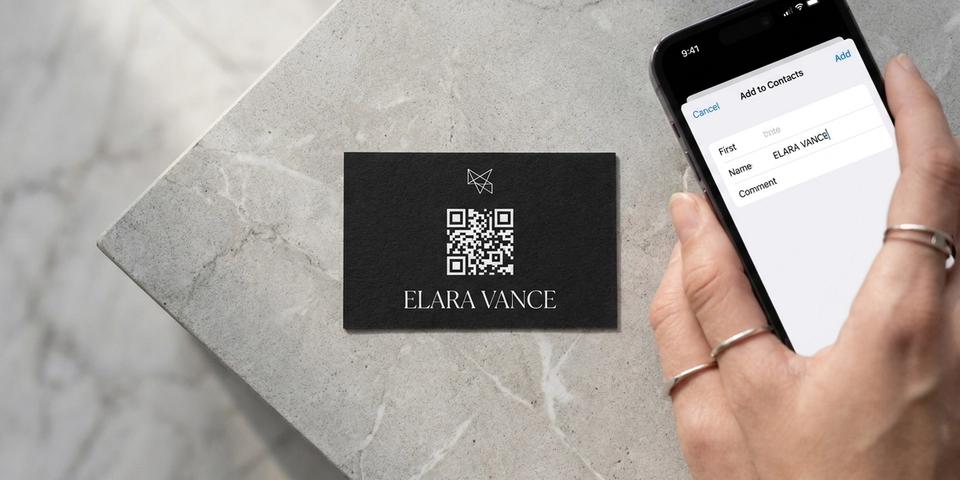
A vCard QR drops your full contact details straight into the other person's phone — no app to install, no typing, no risk of a typo. It works just as well on the back of a printed business card as it does on a sticker or a screen.
- How a contact QR works under the hood (vCard, no app required)
- Why printed business cards aren't going away — and how the QR makes them better
- Three high-impact use cases — events, sales, interviews
- How dynamic editing future-proofs your card when you change jobs
Where the friction actually lives
The most awkward part of swapping contact details has nothing to do with the card itself. It's the moment after — squinting at a phone number, typing it in with autocorrect fighting you, double-checking the spelling of someone's surname, then hoping you got the email right.
That step is what a contact QR removes. The QR isn't there to replace whatever you hand someone. The card, the sticker, the conference badge, the back of a t-shirt — those still matter. What the QR replaces is the typing.
What a contact QR actually does
A contact QR is a small printed code that, when scanned, hands the recipient a fully-formed vCard — the standard format every iPhone, every Android phone, and every desktop email client knows how to read. The phone immediately offers to save the card to the address book.
That's it. No app to install. No follow-up email. No 'let me find a pen.' The recipient taps once, and your name, title, company, phone number, and email are saved next to the people they've known for a decade.
Why this beats 'tap-to-share' apps
Apps like Linq and Popl have nailed the experience for the sender. They're slick, they're branded, and they let you toggle different contact details. But they fall apart on the receiving side: the other person has to install an app, visit a webpage, or accept a profile in a closed ecosystem they didn't sign up for.
A QR-coded vCard inverts the model. The friction lives entirely on your side — once, when you create the QR — and the recipient gets the standard, universally-understood phone-contact flow that ships with their operating system. Twenty seconds, no account, no follow-up, done.
Where this earns its keep
Three places where the math is obvious:
-
Conferences and meetups. You meet thirty people in two days. You hand each of them a card or a sticker with one QR on it. Half save you on the spot; the other half do it on the train home. None of them retypes anything.
-
Sales and field reps. A team of ten reps used to print a fresh batch of cards every time someone got promoted. With contact QRs, the printer order happens once — and the data behind the QR is updated from the dashboard whenever it needs to change.
-
Job interviews and freelance pitches. Hand the interviewer a card with a QR on the back. The friction-free save means your name is on their phone before they've left the room. Subtle, professional, and a small signal that you think about user experience.
Print isn't dead — let the card carry the QR
A well-made business card is still a small artifact of professionalism. Heavy stock, considered typography, a logo you actually like — these signal that you take your work seriously, and they're a tangible thing the other person can hold while you're talking.
Nothing about a contact QR competes with that. The easiest way to use one is to put it on the back of the same business card you'd print anyway. The front carries the design and the brand. The back carries the QR. Hand it over the way you always have — but now the recipient saves your full details with one scan instead of typing seven fields off the front.
For teams that want a one-stop solution, qrgeno can fulfil printed cards directly from the dashboard — matte, gloss, silk, recycled stock, single cards or full print runs — with shipping across the Nordics and EU. If you already work with a designer or an existing printer, you can download the QR as an SVG and drop it into whatever artwork they're producing.
Setting one up
In qrgeno, contact QR is a built-in QR type:
- Open the QR builder and choose 'Contact'.
- Fill in the fields: full name, company, title, email, phone. Optional fields like website and address work too.
- Pick your branding — colours, logo, frame style — or apply a saved template so your team's cards stay consistent.
- Order a sticker, a metal card, or a small print run from the dashboard. Or just download the SVG and have your designer drop it onto whatever paper you already use.
Behind the scenes the QR encodes a redirect to a small qrgeno-hosted page that serves the vCard download. Because it's dynamic, you can edit the data later without touching the printed code.
The dynamic part is the point
Three months from now you switch jobs. The QR you printed still works — you open it in the dashboard, change 'company' from 'Acme AB' to 'Beta AB', and save. The next person who scans your card gets the new details.
The same logic applies to phone numbers, addresses, and email handles. The physical artifact never changes; the contact behind it does. That's the part the static, printed-only version of the business card couldn't offer.
Pair it with a landing page (optional)
For roles where 'just my contact info' isn't quite enough — public-facing founders, real-estate agents, medical professionals — you can route the contact QR to a small landing page before the vCard download. The page can show a portrait, links to social profiles, a short bio, and a 'Save contact' button that triggers the same download. The QR stays the same; the experience around it grows with you.
Which plan does this need?
Contact QRs are included from the Business plan. Business also lets you order printed materials directly, save up to twenty design templates so your team's cards look consistent, and export your scan analytics — useful when you want to know which event was actually worth your time.
Enterprise unlocks priority print fulfilment and unlimited saved templates, which matters if you're rolling cards out across a whole sales org.
The smaller pitch
You don't need to throw away paper. The card you print can be exactly the kind of card you want to print — thick stock, considered design, a brand you're proud of.
What you can change is the slow bit: the typing. A contact QR on the back of that card — or on a sticker, a conference badge, a laptop, a screen — turns the moment you hand something over into a one-tap save. The artifact stays. The friction goes.
Sluta trycka om.Börja uppdatera.
- 5 400 kr
- Sparas i snitt / år
- 3 min
- Installationstid
- 249 SEK
- Starter