
QR codes for taxis and ground transport
One scan connects a business passenger to the right cost centre, invoice reference and taxi app account — no more remembering agreement numbers.
Key features for taxi and ground transport operators
- ✓Issue each corporate customer a unique QR code that links their employees' app accounts to the right billing agreement in one scan
- ✓Replace hard-to-remember agreement numbers and letter codes — drivers and passengers never type a reference again
- ✓Handle invoiceable rides automatically: the QR code resolves to the right cost centre, project code, or department on every booking
- ✓Place QR codes on corporate welcome packs, employee ID badges, hotel check-in desks, reception kiosks, or event lanyards
- ✓Update the linked billing agreement or cost centre server-side without reissuing or reprinting anything
- ✓Use visit count and date range rules to run signup promotions — first 100 scans at a conference get a free first ride
- ✓Track scan origin per location or campaign to see which partnerships drive the most corporate signups
How corporate taxi QR codes work
Corporate taxi billing starts working the moment a passenger scans: give every corporate customer their own dynamic QR code whose default destination is a deep link into your existing taxi app. The link either opens the app with the billing agreement attached, or routes the passenger through the app store first and carries the agreement context across the install.
Once scanned, the app knows the passenger's corporate billing profile. There is no agreement number to type, no letter code to recall, no call to support before the first booking — the next ride lands on the right account by itself.
Dynamic means editable: swap the billing agreement, the cost centre, or the app link a code resolves to whenever you need, and every printed welcome pack, ID badge, and hotel display keeps working untouched. The same model covers the rest of ground transport too — airport shuttles, executive car services, and minibus operators run the exact same corporate onboarding flow from the same kind of code.
Corporate onboarding without friction
Signing up a new corporate customer traditionally means issuing an agreement number, distributing it to every employee, and hoping they enter it correctly in the app. Most don't — and those who do forget it on the next ride.
With a QR code, you issue one scannable credential per company. Print it on the corporate welcome pack, embed it in the customer portal, or email it as a PDF. Every employee scans once, and the link between their personal app account and the company billing agreement is established.
You keep the mapping server-side: this QR code → this agreement → this cost centre. Employees never see the underlying reference. When a company restructures, changes cost centres, or renegotiates terms, you update the link once — every previously scanned QR code resolves to the new setup on the next ride.
For large accounts, issue separate QR codes per department, project, or office location so invoices land on the right internal budget automatically.
Invoiceable rides, correct cost centre, every time
When the QR code links the passenger's app account to a specific agreement, every ride the passenger books through that account is automatically tagged with the correct billing data. Your dispatch system and billing engine already know where the invoice goes — no manual coding, no after-the-fact reconciliation.
For hotels and event venues running corporate contracts, place the QR code at reception. Guests scan, download the app if needed, and the first ride bills back to the venue's agreement with your company. No vouchers to print, no PIN codes to manage, no lost receipts.
Add a visit count rule to cap promotional rides — for example, the first free ride per scanning user. After that, normal corporate rates apply. This keeps introductory offers controlled without a separate coupon system.
QR codes in the car and on the driver
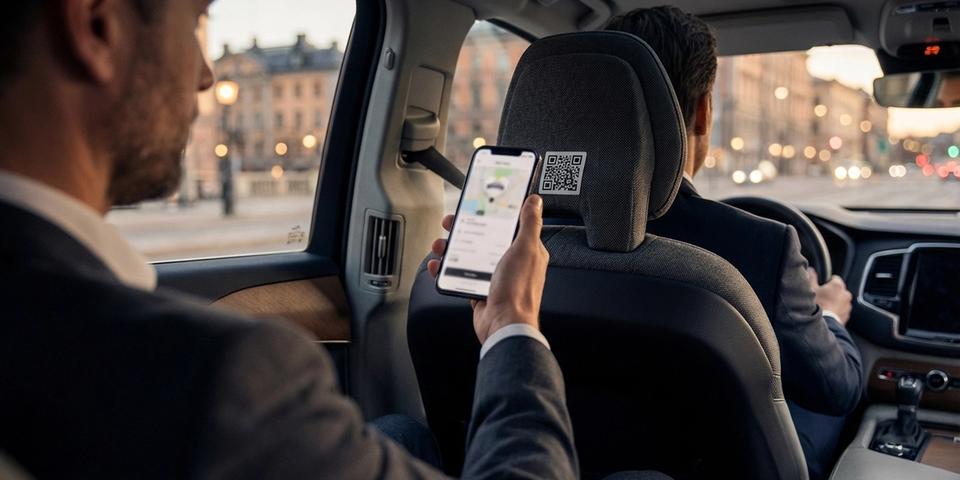
A QR code sticker on the back of the passenger seat, on the receipt dock, or on the driver's ID lets walk-up passengers move from street hail to app booking in seconds. They scan, the app opens with the current driver pre-selected or the nearest pick-up point pre-filled, and the ride proceeds on the corporate agreement they are already linked to.
Drivers stop explaining agreement numbers and letter codes to confused business passengers. Passengers stop fumbling with paper vouchers. Both sides save time per ride, and every ride is correctly invoiced on the first try.
The same QR code can serve different purposes by time of day or day of week — daytime scans route to corporate signup, evening scans route to a promo landing page — by combining date range and visit count rules.
Event, conference, and partnership campaigns
Partner with a conference organiser, airport, or hotel chain and issue QR codes that activate only during the event window. A date range rule switches the destination on automatically on arrival day and back off when the event ends — the physical poster, lanyard, or room card stays the same.
Combine with visit count to manage capacity: the first 500 delegates to scan get a discounted flat rate to the venue, the next 500 get the normal corporate rate, and later scans see a standard signup page. The QR code handles the tiering without anyone at the partner organisation having to run a campaign system.
After the event, the same QR codes continue to work as regular corporate onboarding links, so the partnership keeps delivering signups long after the event is over.
Getting started with taxi QR codes
- Build a dynamic QR code whose destination is a deep link into your taxi app carrying the corporate agreement reference
- Assign one code to each corporate customer — larger accounts can split by department, project, or office
- Attach promotion rules where needed: a visit count rule for free introductory rides, a date range rule for event or seasonal campaigns
- Put the codes where business passengers will meet them — welcome packs, employee portals, ID badges, hotel partner materials, in-car stickers
- Track scan analytics to learn which customers, locations, and campaigns onboard the most passengers
Rules run top to bottom at scan time; the first match applies, and scans that match nothing go to the default destination.
Run the flow with one or two pilot corporate accounts before going wide. When signup friction and billing errors drop, extend the rollout across the whole corporate book.
Changes go live the moment you save — point a code at a new agreement, tweak a campaign rule, or wind down a partnership with nothing reprinted. The plastic and paper stay in circulation; the logic behind them moves at your pace.