
QR codes for hotels
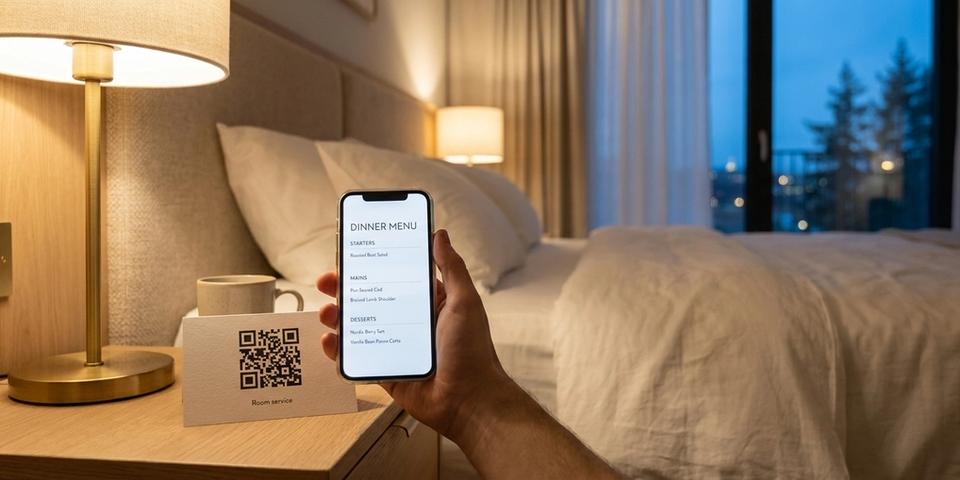
One QR code on every room card — breakfast, lunch and dinner menus that switch by time of day, in the guest's language, without reprinting a single card.
Key features for hotels and hospitality
- ✓One QR code per room card that routes to breakfast, lunch, dinner, or in-room dining based on the time of day
- ✓A “kitchen closed — contact reception” page that takes over automatically outside service hours
- ✓Automatic language switching — Swedish guests see the menu in Swedish, international guests see English, no manual toggle
- ✓Separate weekday and weekend brunch menus using day-of-week rules
- ✓Time-boxed check-in / check-out instructions that change with the clock
- ✓Spa, gym, and activity QR codes that only work during opening hours
- ✓A/B test upsell wording or cover images to see which drives more room-service orders
- ✓Route iPhone guests to the App Store for your hotel app, Android to Google Play, desktop to a web version
- ✓Activate event pages automatically on conference days and deactivate when the event ends
- ✓Password-protect staff-only resources like housekeeping checklists and maintenance manuals behind the same QR layout
- ✓Issue welcome-drink, breakfast, or spa vouchers as a batch — one voucher per guest or per room, emailed or printed on the room card, each with its own redemption counter
How the room-card QR code works
A hotel room QR code lives where the guest already looks: the back of the key card, the welcome folder, a small sticker beside the bedside phone. Behind it sits a default destination — your general "stay with us" landing page — and above that, a stack of rules that decide what each scan actually opens, from the room service menu to tonight's spa offer.
Picture the rule stack as a checklist at the front desk. Every scan is a guest walking up, and the receptionist reads the list from the top: is it dinner service (17:00–22:00)? Hand over the dinner menu. Is the guest Swedish, by geo or browser language? Hand over the Swedish version. Is an A/B rule running two spa upsell pages? Deal them out. The first line that applies settles it; only when the whole list comes up empty does the default page answer. And if a block rule is on — "kitchen closed" after midnight — the guest sees your fallback page instead.
Because the code is dynamic, menus, opening hours, and the whole guest journey can be changed from the dashboard at any time. Nothing gets reprinted; the card in room 214 keeps working season after season.
Room-service menus that follow the clock
Stack four time-of-day rules on the same room-card QR code so it always serves the right menu:
- Time of day 07:00–10:30 → Redirect to Breakfast menu
- Time of day 11:30–14:30 → Redirect to Lunch menu
- Time of day 17:00–22:00 → Redirect to Dinner menu
- Time of day 22:00–07:00 → Block with message “The kitchen is closed until 07:00 — please call reception (dial 0) for late-night service.”
The first matching rule wins, so the menu shown always matches the current time. Between meal services — for example 14:30–17:00 — you can either fall through to a light “all-day snacks” menu or surface a block rule that points to the lobby bar.
No staff action required. No stickers swapped at 22:00. The card on the nightstand silently changes what it serves every few hours, and you can extend dinner by half an hour from your phone when the kitchen is busy.
Kitchen closed — contact reception
Outside service hours the same QR code flips to a clean “Kitchen closed” page instead of a broken menu. Set it up as a block rule with a friendly message and a fallback redirect:
• Rule type: Time of day
• Active between: 22:00 and 07:00
• On match: Block with message “The kitchen is closed until 07:00. Press 0 on the room phone to reach reception for late-night snacks, toothbrushes, or anything else.”
• Fallback URL: a minimal page with reception phone, WhatsApp number, and the address of the 24-hour vending area
Guests never hit a “404” or a menu they can’t order from. They get a clear next step — call reception — which keeps the experience on-brand even at 03:00. You can also add a day-of-week rule so the “closed” window is wider on Sundays or holidays without touching any of the meal rules.
Show the right language automatically
A Norwegian family and a British couple scan the identical code on their room cards — and each sees the menu in their own language, no flag picker in sight.
Place a browser-language rule or a geo-country rule above the time-of-day rules:
- Browser language is Norwegian → Redirect to the Norwegian menu variant
- Browser language is Swedish → Redirect to the Swedish variant
- Default → English menu
Language and time stack cleanly: the Norwegian guest scanning at 19:00 gets the Norwegian dinner menu, while a London guest at 08:00 gets the English breakfast. Each extra language is one extra rule — no duplicated pages, no second QR code by the kettle.
When browser language is a poor signal — many phones are set to English out of habit — switch to the geo-country rule instead: Norwegian and Swedish IPs get their local menu, everyone else gets English.
Meal and amenity vouchers without paper coupons
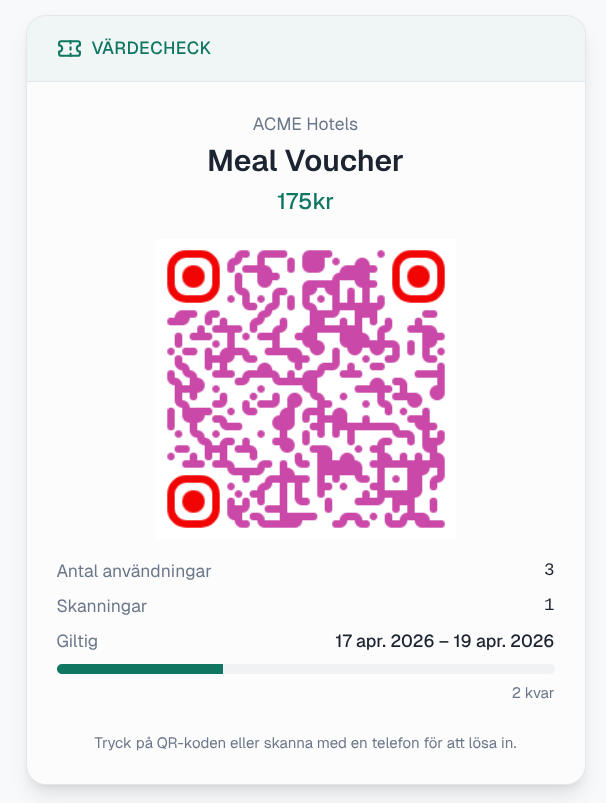
Run hotel promotions — a complimentary welcome cocktail, a half-price breakfast for late arrivals, a free dessert during restaurant week, a spa day-pass for long-stay guests — without printing coupons or training staff to spot paper stubs.
Vouchers live in their own workspace, and you start with a batch: one per campaign, arrival group, or conference. The batch holds the issuer ("Lobby Bar"), the service ("Complimentary welcome cocktail"), the value ("1× house cocktail"), the dates it is valid, and how many redemptions each guest gets — one per day, or one for the whole stay. Then you add the guests: upload the arrival list as a CSV and every row becomes its own voucher QR, or add walk-ins one at a time.
Because each guest has their own voucher, each has their own redemption counter. Nobody can spend somebody else's, and the front desk sees row by row who has been emailed theirs and who has redeemed. qrgeno mails each guest their voucher, or you export the batch as print-ready cards to slip into the room folder — a guest with no email address is flagged for exactly that.
At redemption the guest opens the voucher on their phone and hands the screen to the bar, who tap Redeem. qrgeno hosts both outcomes — the confirmation, and the "can't be redeemed" notice for a voucher that is spent or outside its window — or you point them at your own pages. Raise the cap, extend the dates, or move the window from the dashboard and every voucher already handed out follows along: no reprint, no new card on the pillow. Retailers use the same mechanics for scan-limited voucher campaigns.
More rules to layer on the same card
The room-card QR code doesn’t have to be only about food. Stack rules on top of it to cover the whole stay:
• Weekday vs. weekend brunch — a day-of-week rule sends Saturday and Sunday scans to a brunch page instead of the regular breakfast menu.
• Check-out reminders — a time-of-day rule between 09:00 and 12:00 on the departure day can surface an “express check-out” page with the room bill and late-check-out request.
• Event days — a schedule rule activates the conference agenda QR layout automatically on the morning of the event and deactivates it that night.
• Welcome drinks — a visit-count rule can cap a “complimentary welcome drink” on the shared room-card code to one scan per room. When each guest should have their own instead, use a voucher batch: every guest gets a separate QR code with its own redemption counter, emailed on booking or printed on the key-card sleeve.
• Spa and gym opening hours — time-of-day rules on the spa or gym QR codes block access outside opening hours and redirect to a reservation page.
• App downloads — a device-route rule sends iPhone guests straight to the App Store for your hotel app, Android to Google Play, and desktop to a web check-in page.
• A/B test upsell wording — an A/B rule splits guests between two versions of your spa upsell page (different images, different copy) and attributes each scan so you can measure which converts better.
• Staff-only resources — a password gate behind the same QR layout protects housekeeping checklists or maintenance manuals, while guests continue to see the room-service menu.
• Seasonal or campaign windows — a date-range rule activates a Christmas menu from December 20 through January 7 and disappears on its own.
Every rule is evaluated at scan time. Every change goes live the instant you save it. The card in the guest’s hand never has to move.
Getting started with hotel QR codes
- Set up a dynamic QR code with your "welcome to the room" page or lobby landing as the default URL.
- Head into the Rules tab and book one time-of-day rule per meal service — breakfast, lunch, dinner — each pointing at the matching menu URL.
- Close out the stack with an overnight "kitchen closed" block rule that shows a clear "call reception" message.
- If you host international guests, slot a browser-language or geo-country rule above the meal rules so they land on translated menus.
- Have the code printed on the room card, welcome folder, or nightstand sticker — one design covers the whole property.
- Manage the rest from the dashboard: stretch dinner hours over the weekend, check in a Christmas menu for a week, or A/B test the spa upsell — no reprints.
Open with the meal-time rules and the closed-kitchen fallback; that alone puts a live room service menu touchpoint in every room. Language routing, events, and upsells can check in later.